

Settlement Report
The Settlement Report provides a financial overview at the conclusion of a recovery effort focused on a targeted quantity of leased devices.
Currently, this feature is only available for specific leasing programs that target a fixed amount of devices.
The report provides an overall view of the financial outcomes, including amount owed (if any) along with other costs or possible credits associated with ultimately settling an individual lease program.
The top portion of the page includes the broad overview of the program outcomes.

Lower on the page is a detailed report on the individual devices associated with any costs incurred at the conclusion of the program. This data functions like other grid views within the interface, allowing for sorting, searching, and expanding for added details.
Settlement Report Access
The Settlement Report becomes available for programs that are set to the Closed status by a user with Administrator permissions. The choice to close a program should be based on the overall program goals, like reaching the targeted device quantity for the program, but is flexible based on your needs.
Marking a program as closed is completed from within the Admin Settings section of the software, and navigating to Configuration > Programs. When the program is ready to be marked as closed, the option is to the far right of each program’s row.
When a program is marked as closed, the Settlement Administrator user role then has the ability to manage the financial details of the settlement report. This user role includes a customer level view of all closed programs for this purpose.
Settlement Report List View
Program Settlement reports can be found under Reports from the top navigation, then selecting the Settlement tab.
The grid view of Program Settlements on this page will automatically display any available reports towards the top of the list with the option to View Settlement as an available button. Program Active will be displayed for program rows that are still underway.
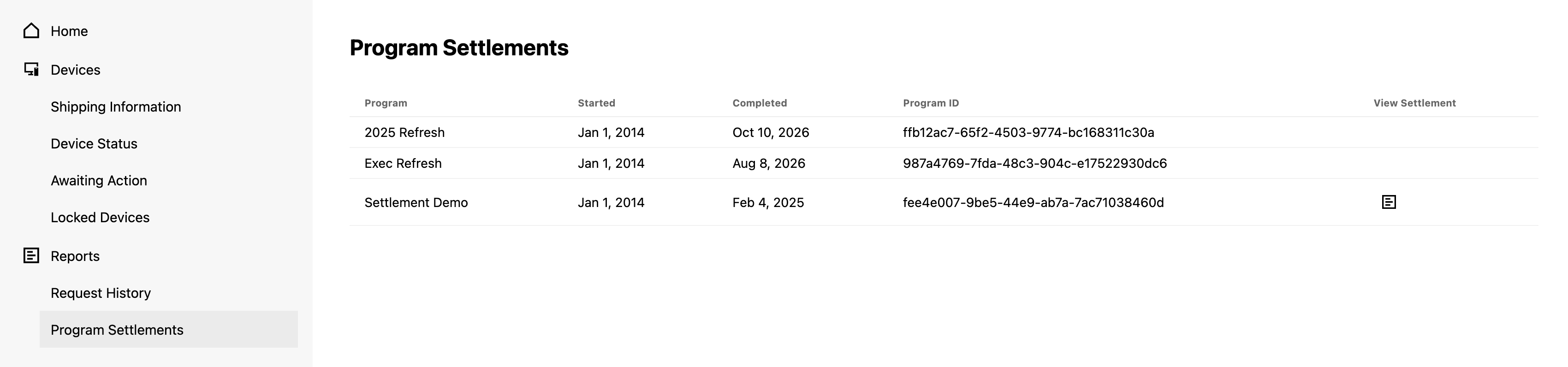
Clicking any available View Settlement will bring up that program’s specific report.
Settlement Report Data
The top portion of the Settlement Report features a line item summary of any costs incurred associated with damages, possible credits or other expenses, and a final total. (Payment instructions to close out any costs associated with the program will be provided by the lending partner.)
Below the line item summary, under the heading Settlement Details, is the serialized data associated with any lower grade devices that have damage and associated costs.
Adding or Updating Settlement Report Data
Both the line item summary and the serialized data are imported into the software by users with Settlement Administrator user role access. When accessing a closed program’s Settlement Report, these users will be able to see two additional options for managing the data import or update process.
Data Expectations
Line item details at the top of the Settlement Report are focused on expected costs. For importing data, a template is available and should be assembled with the following expectations:
- Each row will be reflected in the line item section when uploaded, with an expectation that Total Owed is included. Other categorized credits or charges are flexible to ensure a variety of device and program types can be supported.
- Total Value numbers expect a decimal without the currency symbol or commas. (Example: 1200.00)
- For the import of data, make sure the Item Count contains a “1” for costs incurred once.
- Value Currency, as an example, should feature “USD” instead of “$.”
- Double check both spelling and math in the uploaded template. The line item section within the software is following the template for displayed content.
Serialized data within the Settlement Report Details must match existing data from the associated program. (Example: the serial number and processor unique identifier must be from that program in order to import damage notes and costs.)
Updated over 1 year ago